Speedrunning the development of my first game: Soma Cube
I recently started learning game development, inspired by YouTube videos in which developers “speedrun” small but complete games in one to three months. Making games has been a dream of mine for decades, and I finally got the chance to work on one full-time – if you know what I mean :)
This is a programmer’s journey into game development with the Godot engine. I have decades of programming experience, including 3D graphics, but my art skills are below zero. For my first game, I chose a small 3D puzzle I had already implemented in raw OpenGL a decade ago: Soma Cube.
3D games are harder to make than 2D games, but I enjoy them much more. I like only a few 2D genres, such as point-and-click adventures, and those depend heavily on writing and 2D art. I am no good at either. Writing is an art too, remember? So that ruled them out as well.
TL;DR
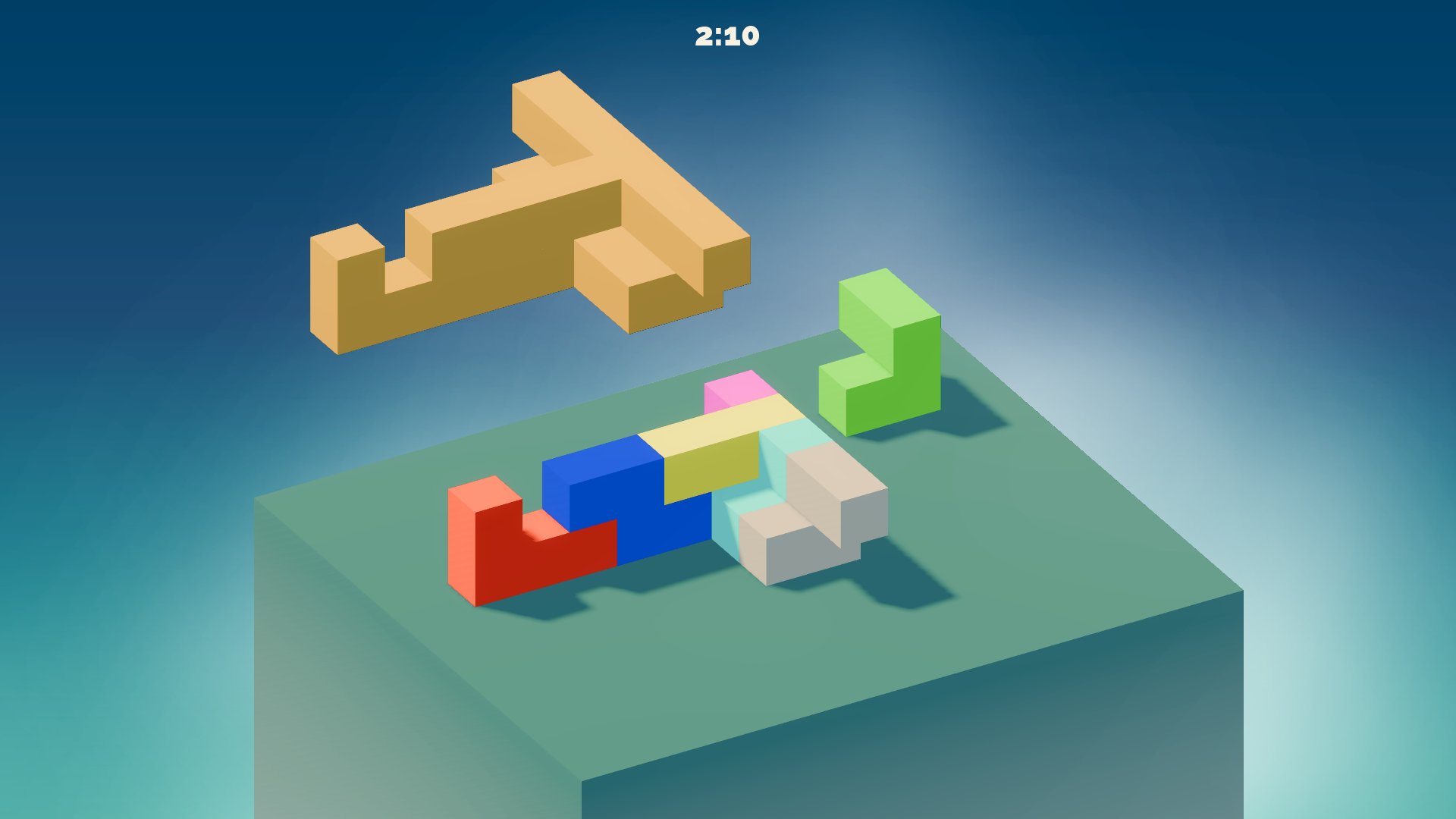
In one month, I built a complete 3D Soma Cube puzzle game using beta builds of Godot 4.7. I then published a web demo on itch.io and spent another two weeks completing the Steamworks onboarding, preparing store assets, and releasing a Steam demo. You can play the demo and wishlist the full game below :
Why Soma Cube
Soma Cube is a wooden puzzle invented by Danish mathematician Piet Hein in 1933. Its seven pieces are made from unit cubes and fit together into a 3x3x3 cube1. The real fun is using them to build dozens of other 3D shapes or inventing your own.
I loved this puzzle as a kid and spent countless hours assembling every shape I could. That familiarity made it a good first project: I knew the rules and many of the solutions, and the game needed few art assets beyond its 2D user interface. It is cubes all the way down.
Kick-off
On the first day, I built the basic controls for selecting and moving a unit cube, then started experimenting with 3D rotation gizmos. Selection uses ray casting: I cast a ray through the scene and detect a box collision. While the mouse button is held, I project the cursor onto a plane at the original hit point’s Y coordinate and move the cube by the offset between the initial and current projected positions.
Over the next week, I dug out my decade-old source code and reused its puzzle definitions. I wrote a GDScript loader for my JSON-based format, which saved me weeks of entering puzzle shapes by hand. I also loaded the definitions of the seven pieces into a custom Resource.
Once the data was in place, I could render the pieces and target-shape previews. Because everything is built from cubes, the rendering itself was simple. I added colors and soft gradients early; pure grayboxing bores me, and I need at least a little visual feedback to stay motivated. I also procrastinated by refactoring the rendering to use mesh instancing, reusing a single cube mesh for all puzzle previews and pieces.
Gameplay
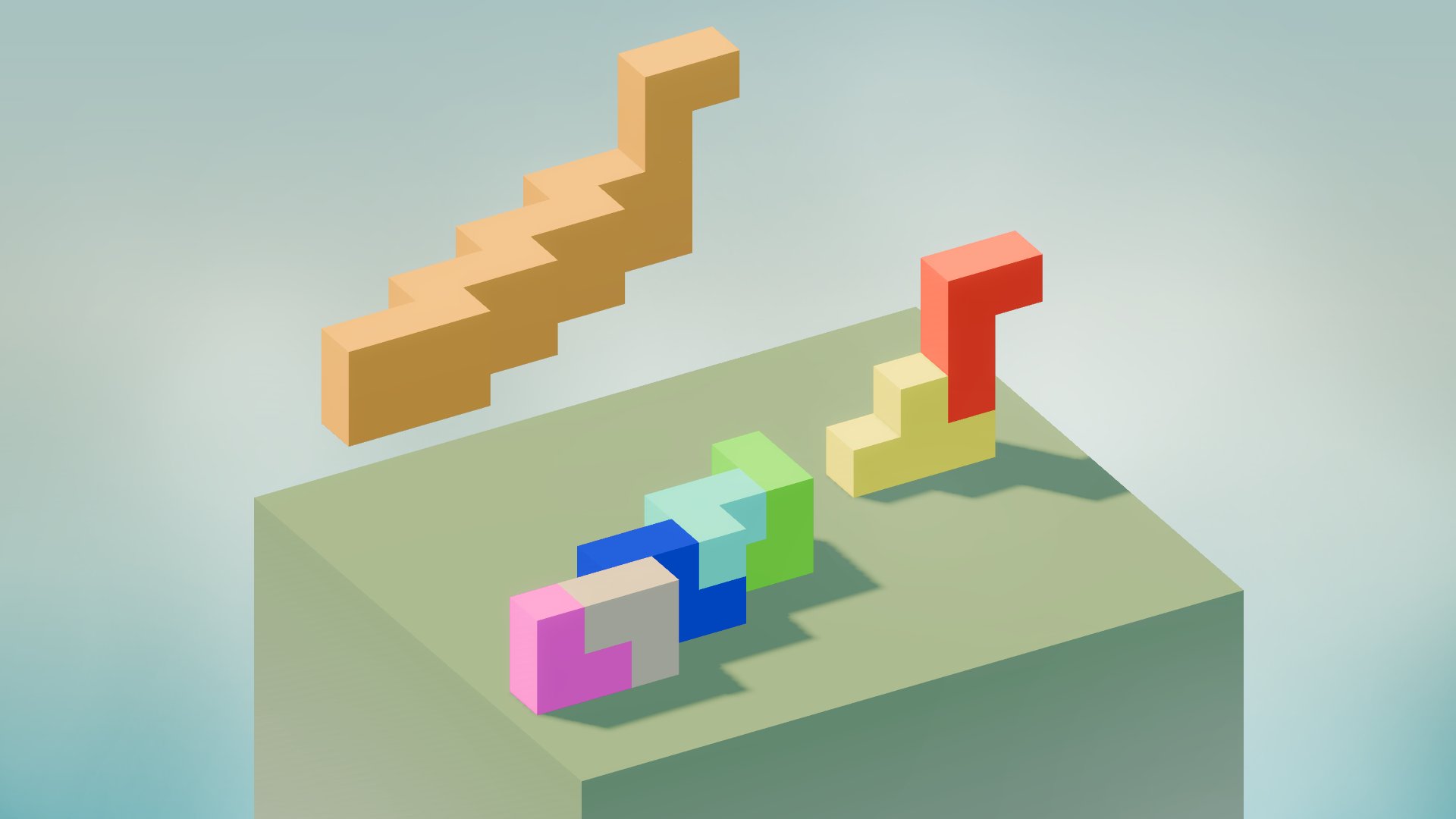
With the pieces and target-shape preview working, I moved on to the core gameplay. My single-cube movement code already handled groups of cubes, so it could move whole pieces too. The missing part was collision detection between pieces: they could still overlap.
My old implementation used a voxel grid whose occupied cells represented the unit cubes. The same approach still worked: before moving a piece, I checked whether each of its cubes would land in a free cell. To simplify collision detection for rotated pieces, I precomputed the occupied cells for every piece rotation at startup.
After solving collision detection – including rotated pieces – I switched to an easier task to avoid burning out: the puzzle-selection screen. I wanted actual 3D previews rather than a 2D CanvasLayer, so I built the picker as a full 3D scene. When the player selects a puzzle, its rotating 3D preview smoothly moves from the picker to its larger in-game preview position. The video shows the picker; try the demo to see the full transition.
The demo has only 12 puzzles, so they all fit on one page without pagination. The full game adds pagination for the remaining puzzles. I plan to release it next month.
Visuals
By the second week, the plain visuals were killing me, so I started polishing them. My biggest problem was Godot’s default sky background. I first tried a camera-aligned plane with a custom gradient shader, but it felt fragile and awkward to maintain. I replaced it with a 2D CanvasLayer containing a gradient texture behind the 3D scene, using the canvas background mode in WorldEnvironment. The result was cleaner and easier to configure.
The scene was still static; nothing moved or animated on its own. True volumetric fog is unavailable in the Compatibility renderer required for web exports, so I followed an alternative from the Godot documentation. I used a very slow CPUParticles3D emitter with a smoke texture, huge particles, and proximity fade enabled. Proximity fade hides the hard intersections between particles and geometry, which is the secret sauce that makes the fake fog blend into the scene. It does this by fading each pixel based on its distance from nearby geometry.
Shadows came next. Web exports impose tight performance limits, so I kept the shadow-map resolution modest. Because the scene is small, I could use the fastest orthogonal shadow mode on the directional light and set a short maximum distance. The result is soft enough without looking too blurry. It is better than good; it is good enough. Next :)
During the same week, I started the solution verifier. It became tedious, so I escaped back to the visuals.
I removed the temporary heads-up display (HUD) rotation buttons and replaced them with 3D gizmos that move with the selected piece. The arrowheads grow slightly on hover, which makes them feel responsive. I also fixed visual glitches in the puzzle picker, refined the card design, and added the seamless transition from the rotating preview to its in-game position.
Another important improvement was the ghost preview, which shows where a piece will snap before the move is committed. It also shows invalid placements, such as intersections with other pieces. To add some “juice,” I made the piece shake when the player tries an invalid move or rotation.
Building the game loop
The third week was about turning the prototype into a complete game. I added the tedious essentials: a main menu, settings, and an end screen for solved puzzles. The settings screen controls sound and music volumes, toggles full-screen mode, and persists those settings using Godot’s ConfigFile class.
The main scene and script had grown too large, so I spent a full day splitting the menus into separate scenes and reconnecting their signals to the main script. I am a developer; refactoring is the way ¯\_(ツ)_/¯.
Then I finished the solution verifier, including support for rotated and off-center solutions. Once the console could confirm a solved puzzle, I added the solved-puzzle pop-up. I do not enjoy building user interfaces, but assets from Kenney and Prinbles helped.
Next, I added the timer and saved each puzzle’s best completion time in a JSON file for display on the puzzle picker. That completed the core loop: open the menu, choose a puzzle, solve it against the clock, and save a new best time.
The game still lacked sound and music. The settings already had volume sliders, but they did nothing :)
I browsed free assets on itch.io and chose sound effects (SFX) by FilmCow and music by LonePeakMusic . Because I had configured the audio buses when I built the settings screen, I only needed to make the existing signals trigger the UI and piece-interaction sounds. I added random pitch variation so repeated effects would not assault the player’s ears.
At this point, the game was finally coming together, with nearly all its pieces in place.
After another refactoring pass, I fixed several smaller problems. Previews of some puzzles – looking at you, Tower – were cropped when centered on the board, so I positioned each preview according to the puzzle’s dimensions. I also enlarged the play area into a pillar-shaped plinth that extends below the camera and fades into the fake volumetric fog.
Then I added credits for the SFX and music, tweaked a few colors, and hid the timer until the puzzle begins. I also explored Godot’s localization tools and chose the comma-separated values (CSV) workflow, which is sufficient for a game this size.
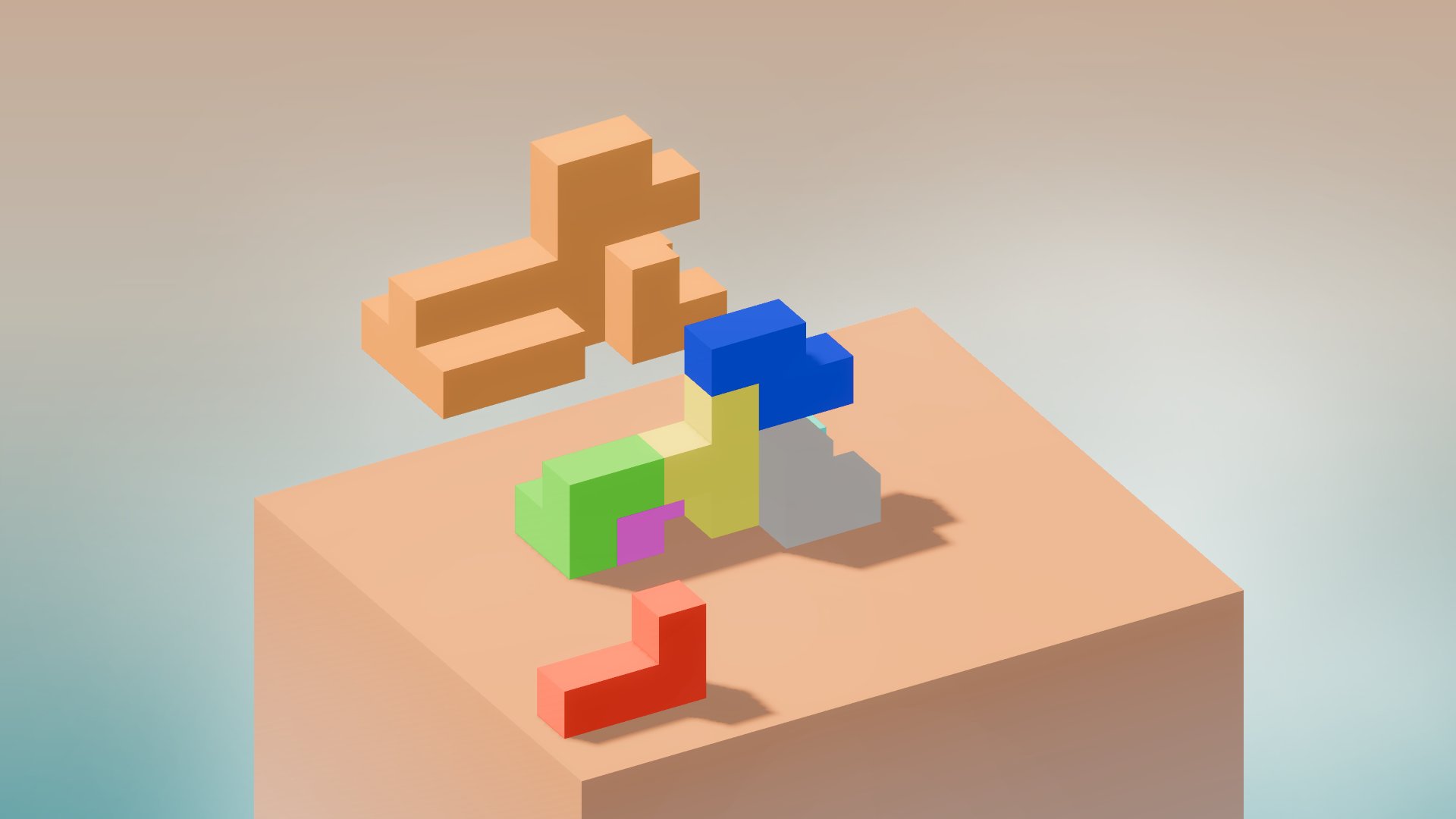
The last task that week was outlining the selected piece. There are several ways to render outlines in Godot, and version 4.5 added native stencil-buffer outlines to StandardMaterial3D. However, StandardMaterial3D’s outline mode does not suit blocky geometry: the outline breaks apart at cube edges.
I wanted a uniform-width outline around the visible edge of the whole piece, so I used 2D lines rendered on an overlay CanvasLayer. Soma pieces have so few polygons that computing their visible edges in GDScript is cheap. I transform each visible edge from world space to screen space, then draw a thick white line between its projected vertices. This even works while pieces are animating and rotating2. To add a little “juice,” I tween the line width when the player selects a piece or clicks the selected piece again.
Polishing and demo release
After four weeks of full-time development, I had a complete game. It was still a little rough around the edges, but it was playable, not entirely ugly, and had not crashed on me. That was enough for an itch.io web demo of Soma Cube .
Before publishing it, I gave the UI and UX one more pass: more consistent colors, extra UI tweens, and smoother movement, snapping, and rotation.
The itch.io demo
This was my first web export, and Godot made the basic process easy. Because I had planned for the web from the start, I had already checked the platform limitations. For this game, that meant using the Compatibility renderer, CPU particles instead of GPU particles, and a particle-based substitute for volumetric fog.
The first real problem appeared only in the browser: the game stuttered whenever it used certain visual effects for the first time. Selecting a piece triggered the outline shader; showing the ghost preview, opening the puzzle picker, and spawning particles caused similar pauses. After that first use, everything ran smoothly.
The culprit was shader and pipeline compilation. Godot, like Unity, compiles some rendering variants only when they are needed for the first time. A material may also need separate variants for different lights or light counts. Compilation was fast enough in desktop builds that I did not notice it, but the browser build made the pauses painfully obvious. I did not investigate why the difference was so big in WebGL.
To remove the web stutter, I looked into precompiling shaders in Godot 4.7. With the Compatibility renderer, the workaround is to load every material and shader, apply each one to a mesh, and render it for at least one full frame. I use a simple plane mesh for this.
To hide that warm-up process, I placed a custom splash-screen scene over the game. In the main script’s _ready() function, the code traverses the project files, loads scenes and resources, extracts the materials from them, applies them to the plane mesh, and forces a frame to render. Once the warm-up finishes, the splash screen fades out.
I also replaced Godot’s default splash screen with my own logo, and the two splash screens transition smoothly from one to the other.
Another problem was font coverage. Chinese, Japanese, and Korean (CJK) characters rendered as tofu (empty boxes caused by missing glyphs). Adding CJK fonts would have roughly doubled the export size, so I left them out of the web build for now. I also removed the background music to keep the download small; it remains available in the Steam demo .
Try the Soma Cube web demo on itch.io .
The Steam demo
After publishing on itch.io, I turned to preparing the Steam demo . That took another week because I had to complete the Steamworks onboarding, prepare the store page, and wait for Valve’s build review. The store page alone needed dozens of visual assets, including capsule images in far too many sizes.
I also made my first game trailer. It is only 30 seconds long, so it doesn’t bore people to death.
The Steam demo includes two extras omitted from the itch.io build: CJK language support and background music.
What I learned
I learned a lot during that intense month. Before starting the project, I had spent about two months toying with Godot, and I had also tried an early Godot 4.0 beta years ago. Most of that experience was casual 2D experimentation, though, and I did not have much time for it. Here is what I learned:
- Being your own boss is very hard – I knew that already, but knowing it in theory is different from experiencing it
- I can build and ship a complete game on my own – asset packs are my friends
- Some genres let a solo developer build a polished game with very few custom assets
- The code is a total mess because I was learning and speedrunning development at the same time – standard game development :D
- Refactoring is a trap for developers – it is our “productive” procrastination
- GUI code is horrible and full of boilerplate, especially menus, which are basically forms
- Precompiling shaders is essential for smooth web exports and often useful for desktop builds
- Shipping a game involves far more administration and store artwork than I expected
- I learned about Steam Next Fest too late to submit a polished demo, but I will not miss it next time
What’s next
Soma Cube is my first released desktop and web game, so there is plenty I still want to improve. The biggest issue was the camera controls. I have already improved them in the public demos, and I plan to cover those changes in the full-release post.
More puzzles are the obvious next step. The demo contains 12. The full game will launch on Steam with 36, but I still do not think that is enough.
Further ahead, I want to add the Soma Cube variant I owned as a child, which replaces one of the two mirrored 3D pieces with a flat 2x2 square piece. I would love to preserve that version digitally. My much longer-term list includes the Diabolical Cube and other 3D polycube puzzles.
For now, the speedrun proved its point: I can make and release a game, and the next one should be a little less chaotic. I also had a lot of fun along the way :)